 SnapDictate
Turn a transcript and screenshots into an implementation checklist
Extract each requested change, connect it to its source, and give it an observable acceptance check. Keep preservation instructions, unresolved questions, and background observations distinct. Treat extracted tasks as Proposed until someone compares them with the original review. An item becomes Verified only when there is evidence for its acceptance check—not because an agent marked it Done.
The checklist is a working record of decisions and evidence, not a more authoritative replacement for the source material.
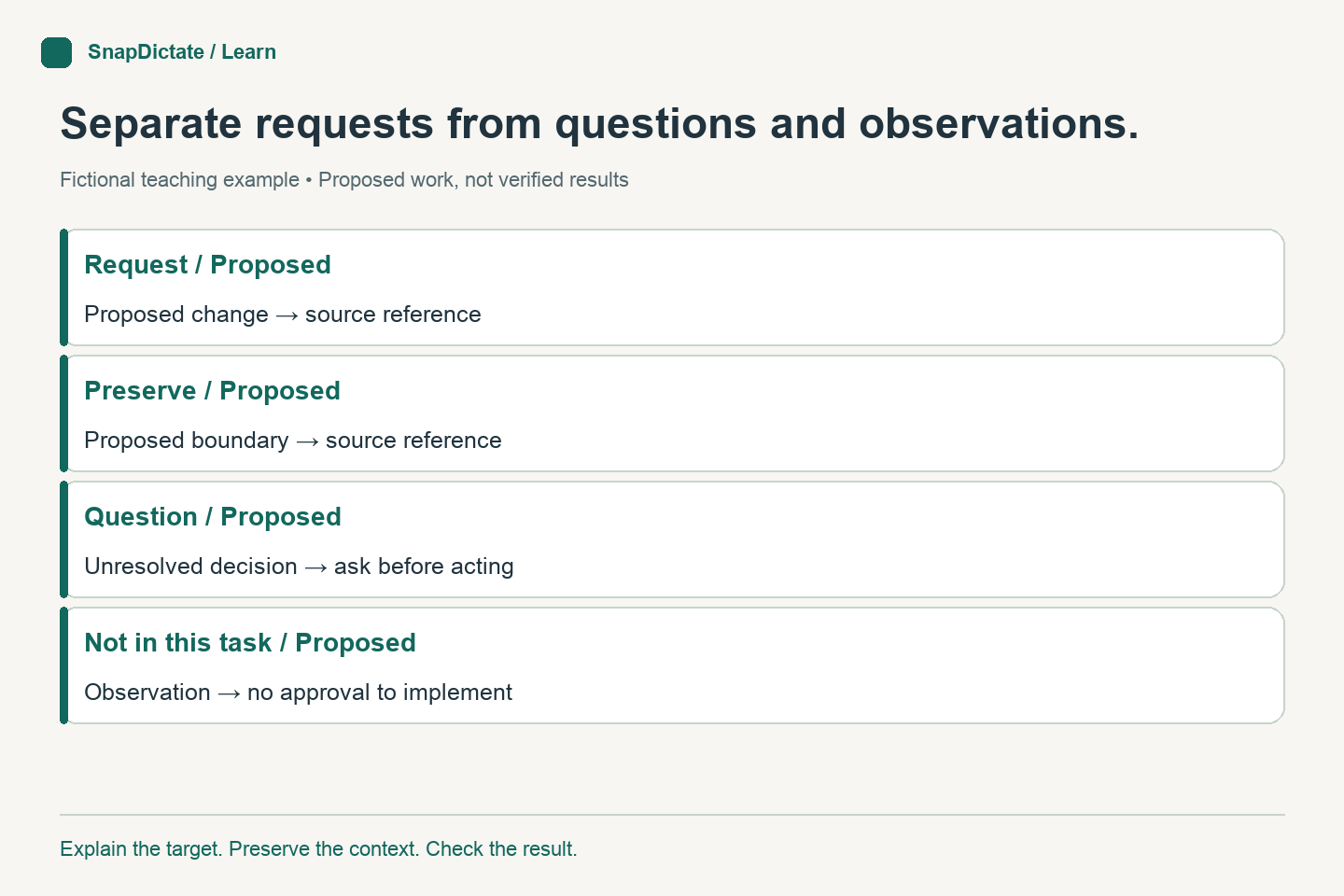
Start by separating four kinds of statement
A review can contain an action request, a rule about what must remain, a question, and an observation in the same paragraph. Turning every sentence into a task creates work nobody approved.
Here is a fictional transcript from TrailTable, a membership-management app:
T1: On Members, change the button label from “Add” to “Add member.”
Keep its current invitation action and the existing required fields.

T2: I'm capturing the button and invitation dialog now. The trial-account
badge looks small, but leave it for this review.

T3: After a successful invitation, change the confirmation to
“Invitation sent.” Should the dialog also close automatically?
I'm not deciding that yet. Keep its current close behavior for now.
The source contains two approved change requests: the button label and confirmation text. It also contains preservation rules. The small badge is an observation explicitly excluded from scope. Automatic closing is an unresolved future decision, with a clear instruction to preserve the present behavior meanwhile.
The screenshot, called S1 in this example, would locate the button and dialog. It would not prove that an invitation was sent or establish the existing close behavior on its own.
Extract tasks without inventing scope
The first pass should preserve meaning rather than improve the product. “Add member” does not authorize new invitation fields. “Invitation sent” does not authorize sending an additional email. A question about closing a dialog is not approval to change it.
Create a draft record and label it Proposed. Review it against the source before moving any item to Approved.
| ID | Request or constraint | Source | Priority | Acceptance check | Question | Status |
|---|---|---|---|---|---|---|
| TT-01 | Replace “Add” with “Add member” | T1; S1 for location | Normal | Exact label appears; existing invitation action still opens | None | Proposed |
| TT-02 | Replace successful-invitation message with “Invitation sent” | T3 | Normal | Approved success state displays exact text; failure state does not display success | None | Proposed |
| TT-P1 | Preserve required fields and invitation behavior | T1; inspect current implementation | Constraint | Required-field checks and invitation flow still behave as before | Baseline evidence needed | Proposed |
| TT-P2 | Preserve dialog close behavior | T3 | Constraint | Close behavior matches the pre-change baseline | Future automatic-close decision remains open | Proposed |
Priority here is an editorial suggestion for the fictional example, not a priority extracted from the speaker. In a real checklist, either supply the approved priority or mark it Unassigned. Do not manufacture urgency from the order in which something was mentioned.
The excluded badge observation should remain in a brief “Not in this task” note, not in the implementation queue. The closing question belongs in the decision record until the owner resolves it.
Use a record that connects the task to its evidence
ID:
Request:
Source reference: [transcript section, screenshot, approved document]
Priority: [approved priority or Unassigned]
Preserve:
Acceptance check:
Question or dependency:
Status: Proposed
Implementation evidence:
Verification evidence:
Unverified limits:
A source reference should help another person find the original instruction. “From the review” is weak when a package contains several pages and many images. Prefer “Transcript T3; screenshot S1, marker 2” or the actual labels in your source.
Do not invent line numbers or timestamps. When the source lacks stable references, add clear section labels to a working copy and say that you added them for navigation. Keep the original available.
For better source requests before extraction, use the five-part change template.
Use status labels that say what happened
A practical sequence is Proposed → Approved → Implemented → Verified. Add Blocked, Failed check, and Superseded when those states are needed. These are recommended tracking labels, not a claim about the status names in any particular product.
Proposed means an item has been extracted but still needs reconciliation with the source. Approved means the scope and decisions are accepted. Implemented means the relevant change has been made. Verified means the stated check was performed and supporting evidence was recorded.
If your tracker already uses Done, define it. It can mean “implementation finished,” but it should not silently mean “tested in production.” One checkbox cannot communicate all those distinctions without a shared definition.
In TrailTable, the agent might change the confirmation string successfully but lack a test account that can send an invitation. TT-02 would then be Implemented, with verification blocked. The missing access is a useful fact, not a reason to invent a passing test.
Compare the checklist with words and images
Before approval, read the source again. Check for omissions as well as incorrect additions.
A screenshot might show two buttons labeled Add. If the transcript does not identify which one, the checklist needs a question, not a guess. A handwritten marker might point to a different section from the spoken description. Record that conflict and resolve it before implementation.
Check preservation instructions especially carefully. They are easy to lose when the draft emphasizes action verbs. “Keep the current validation” is part of the requested outcome even though it does not describe a new feature.
Also inspect uncertain transcription. A guessed email address or amount can turn a small text edit into the wrong requirement. Copy approved strings from a reliable source rather than silently correcting them from context.
SnapDictate's optional brief supplies a proposed checklist alongside the review materials. The receiving agent should still inspect the source text and screenshots, identify gaps, and verify changes. The generated list is not proof that all requirements were captured. See how the handoff works.
Add newly discovered work without disguising it as approval
During implementation, an agent may find a related defect. Perhaps the invitation action has a separate error path that was already broken. That discovery does not automatically expand TT-01 into a full invitation-system repair.
Add a Proposed item with its evidence and reason. Explain whether it blocks the approved task. If it is required to complete the requested behavior, ask for the smallest necessary scope decision. If it is unrelated, leave it outside the current work.
For unintended regressions introduced by the agent, use the recovery request rather than quietly redefining the acceptance criteria.
Close an item with a specific result
A useful verification entry names the environment, action, expected result, observed result, and evidence reference. For example, an illustrative entry might say: “In the test preview, opening Members shows Add member; selecting it opens the unchanged invitation dialog. Evidence: reviewed capture and recorded test steps.”
Do not copy that example as a real test result. Replace it with what actually happened. When only the label was inspected, say so. When a check failed, keep the failure visible until it is resolved or explicitly accepted as a limitation.
Update the current checklist rather than starting another competing version. If the work moves to a different conversation, carry this status and evidence into the project handoff document.
Checklist questions
Should preservation rules be separate items?
They can be separate constraints or fields attached to each task. Choose the structure that makes them hard to overlook. Either way, give important preservation rules a check rather than leaving them as background prose.
Can the AI approve its own extracted checklist?
It can compare the extraction with the source and explain its interpretation. Approval of unresolved product decisions still belongs to the authorized decision-maker. A confident summary is not that approval.
How much evidence does a small text change need?
Usually less than a data or permission change. Check the exact text in the intended location and any plausible effect on wrapping or neighboring behavior. Keep verification proportional, but do not substitute a completion message for the check.
What happens when the source contradicts itself?
Record the conflicting references and identify the unresolved choice. Do not merge incompatible instructions into a fictional compromise. Resolve the decision, then update the affected item and preserve the correction history.
Sources
Published by SnapDictate / RepX Inc., the maker of the product mentioned here. About and corrections.